


Hướng dẫn người dùng
Tùy chọn hiển thị
Ở đây bạn có thể đặt các tùy chọn hiển thị bổ sung cho phép chiếu lời bài hát. Các tùy chọn có sẵn khác nhau tùy thuộc vào chế độ bạn đang cấu hình.
Phép Chiếu Lời Bài Hát
Nếu bạn đang xem bản xem trước phép chiếu lời bài hát, bạn sẽ có thể cấu hình các cài đặt sau:
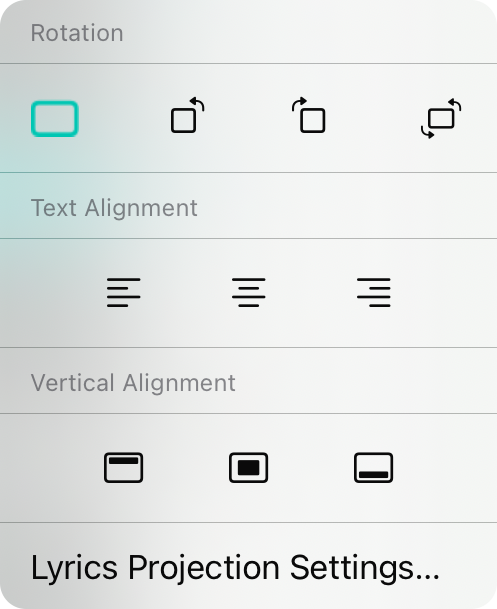
Xoay
Đây là phép xoay của màn hình. Mặc định là 0º hiển thị hướng ngang. Các tùy chọn khác bao gồm xoay sang trái (270º), xoay sang phải (90º) hoặc xoay ngược (180º).
Căn Chỉnh Văn Bản
Ở đây bạn có thể thay đổi căn chỉnh văn bản của lời bài hát. Mặc định là căn giữa nhưng bạn cũng có thể chọn căn trái hoặc căn phải.
Căn Chỉnh Dọc
Ở đây bạn có thể chọn vị trí bố cục lời bài hát trên màn hình hiển thị lời bài hát. Mặc định là ở giữa nhưng các tùy chọn khác bao gồm trên cùng và dưới cùng.
Cài Đặt Phép Chiếu Lời Bài Hát
Bạn có thể sử dụng tùy chọn này để mở cài đặt cho phép chiếu lời bài hát trực tiếp.
Bộ Theo Dõi Sân Khấu
Nếu bạn đã cấu hình chế độ bộ theo dõi sân khấu, menu này sẽ được hiển thị cho phép bạn cấu hình các tùy chọn hiển thị cho chế độ bộ theo dõi sân khấu.
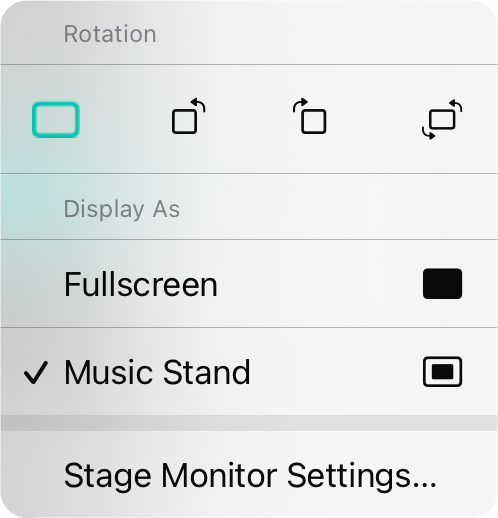
Xoay
Đây là phép xoay của màn hình. Mặc định là 0º hiển thị hướng ngang. Các tùy chọn khác bao gồm xoay sang trái (270º), xoay sang phải (90º) hoặc xoay ngược (180º).
Hiển Thị Dưới Dạng
Điều này xác định cách chế độ bộ theo dõi sân khấu được trình bày.
- Toàn Màn Hình hiển thị bảng hợp âm hoặc bản nhạc từ cạnh này sang cạnh khác mà không có đường viền. Điều này chiếm toàn bộ màn hình.
- Giá Nhạc sẽ hiển thị bảng hợp âm hoặc bản nhạc như thể trên giá nhạc. Điều này sẽ để lại một số khoảng trống xung quanh trang ảo và sẽ hiển thị hai bài hát cạnh nhau khi ở hướng ngang.
Cài Đặt Bộ Theo Dõi Sân Khấu
Bạn có thể sử dụng tùy chọn này để mở cài đặt cho bộ theo dõi sân khấu trực tiếp.


