


Panduan Pengguna
Dokumen

Tab Dokumen memungkinkan Anda mengubah pengaturan dokumen untuk setiap lagu seperti mode cahaya rendah, warna tint, font, ukuran kertas, dan margin.
Mode
Mode menentukan warna yang digunakan untuk menggambar lagu di layar dan dapat digunakan untuk membantu membuat layar lebih terlihat di lingkungan yang berbeda atau bagi pengguna dengan gangguan stres visual. Mode berubah sesuai dengan Mode Cahaya Rendah. Jika tidak ada opsi yang dipilih, OnSong akan menampilkan lagu menggunakan pengaturan default. Opsi meliputi:
- Kertas menampilkan lagu dalam kontras tinggi hitam dan putih.
- Redup menampilkan mirip dengan kertas, tetapi dengan kontras lebih rendah.
- Sepia menampilkan mirip dengan redup, tetapi dengan nada warna yang lebih hangat.
- Langit menampilkan lagu dengan melapisi tint biru untuk membantu dengan gangguan stres visual.
Mode Cahaya Rendah
Di sebelah kanan tombol mode terdapat ikon yang dapat Anda gunakan untuk mengalihkan mode cahaya rendah. Ini diatur di seluruh sistem saat dialihkan dan Anda akan melihat bahwa hal itu menerapkan perubahan tersebut ke mode yang telah kami pilih juga. Ini mempengaruhi semua lagu dan menu di OnSong.
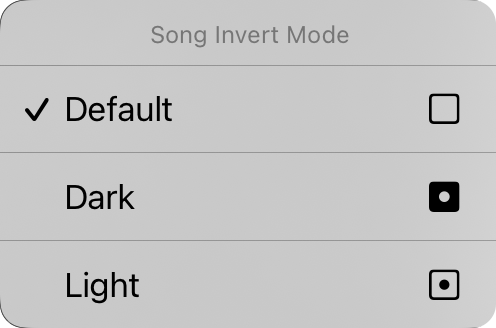
Anda juga dapat mengetuk dan menahan tombol cahaya rendah di iOS/iPadOS 14 dan lebih tinggi untuk menampilkan menu konteks Mode Balik Lagu. Dari sini Anda dapat mengubah mode cahaya rendah untuk dokumen tertentu. Ini diatur ke "default" secara default yang berarti dokumen lagu akan berpartisipasi dalam mode cahaya rendah saat berubah di sistem. Anda dapat memaksa dokumen lagu untuk dilihat dalam mode gelap atau terang di sini terlepas dari mode cahaya rendah yang diatur untuk aplikasi.
Keluarga Font
Empat tombol di bagian atas menu memungkinkan Anda memilih font seluruh lagu. Anda dapat memilih dari:
- Georgia adalah font serif yang mungkin lebih mudah dibaca bagi beberapa pengguna.
- Helvetica adalah font sans-serif yang sempurna untuk menampilkan bagan akord. Default.
- Courier adalah font lebar tetap yang berguna dalam beberapa kasus untuk menyelaraskan akord.
- Marker adalah font tulisan tangan yang sangat sempit, memungkinkan lebih banyak konten agar sesuai di halaman.
Halaman
Ini memungkinkan Anda mengatur ukuran halaman virtual yang mempengaruhi ukuran font yang Anda pilih. Misalnya, ukuran kertas yang lebih besar akan menampilkan font dalam ukuran yang lebih kecil. Ikon di sebelah kanan memungkinkan Anda memilih antara orientasi potret dan lanskap.
Margin
Margin memungkinkan Anda menambahkan inset pada tepi kertas virtual di layar. Ini berguna untuk membuat teks terlihat dan memberikan ruang untuk Sudut Panas atau Zona Navigasi saat juga menggunakan pemilihan bagian. Ikon di sisi kanan menunjukkan saat margin diubah: kiri, kanan, atas, atau bawah.
Footer
Ini memungkinkan Anda mengatur ukuran footer sebagai persentase dari ukuran font lirik. Anda juga dapat menggunakan tombol di sebelah kanan untuk mengalihkan footer aktif dan nonaktif.
Semua kontrol di tab ini kecuali mode cahaya rendah berlaku untuk lagu yang dipilih. Kami akan melihat cara menerapkan perubahan kami ke lagu yang berbeda di perpustakaan kami sebentar lagi.
Anda dapat mengubah nilai default dari setiap aspek dokumen dengan mengetuk ikon kunci di sudut kiri atas untuk mengakses opsi Dokumen Preferensi Gaya.


