


Read The Bleepin’ Manual
Synesthesia
 Color is how we see the world so it should come as no surprise that color can help us understand complex information, including music. Some musicians even experience color when hearing certain notes or chords. OnSong can render chords in color to help draw attention to them. Synesthesia is what we call color-coding certain fonts based on their interval.
Enabling Synesthesia
Synesthesia is only available when formatting chords and can be accessed through a rainbow-colored swatch at the end of the color picker. Choosing this swatch will cause the chords on the page to render in different colors based on their interval relative to the root of the key.
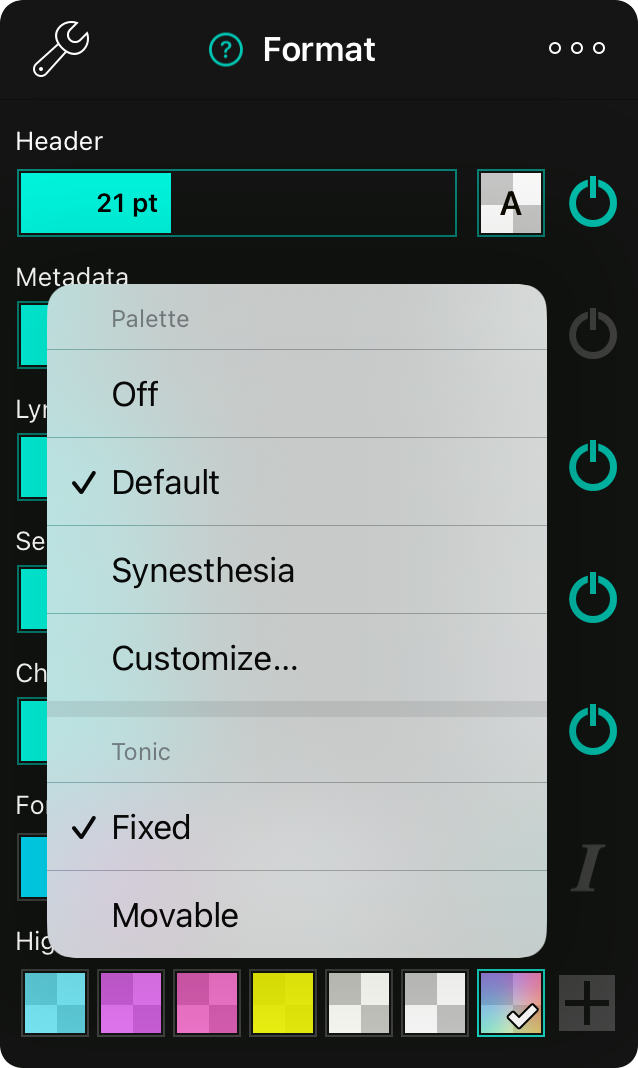
Changing Palettes
Tap and hold on the rainbow swatch to change the palette used for coloring chords. These include:
- Off disables color-coded chords.
- Default uses a basic, rainbow color scheme moving from red through violet.
- Synesthesia uses colors that individuals experiencing the phenomenon of synesthesia report when hearing specific notes.
- Customize… lets you choose your own colors used to render chords using the palette editor.
Palettes you save with Customize… appear by name in this menu, alongside Default and Synesthesia.
Customize
Choosing Customize… opens a two-column sheet. Your palettes are listed on the left, and the palette you select opens for editing on the right.
Color Palettes
This list shows every palette, including Default and Synesthesia. Tap a palette to edit it. Tap + to add a new palette. Swipe a palette to the left and tap Delete to remove it.
Palette Name
The editor is titled New Palette or Edit Palette. Type the name you want to see in the palette menu. If you leave it blank, OnSong names it “Palette” followed by a number.
Note Colors
This list has one row for each of the twelve notes, from C through B, with a swatch showing its color. Tap a row to choose a new color for that note. On iPhone, this opens a Color For screen for the note. Tap Done to save the palette.
Choosing the Tonic
Individuals experiencing synesthesia typically visualize certain colors when hearing specific notes or pitches. Because of that, the tonic is fixed by default, meaning that each color is assigned based on the root note of the chord. In this model, a C chord is always red. You can change the tonic strategy used for assigning colors to chords:
Fixed
This is the default and maintains a specific color for the root note of the chord.
Movable
This changes the palette to assign the first color to the root of the key. For example, if you are playing in the key of A, the "A" chord would typically appear in a bluish color if using the Default palette. If the tonic is set to movable, the "A" would render in red since it is the root interval of the key.


